

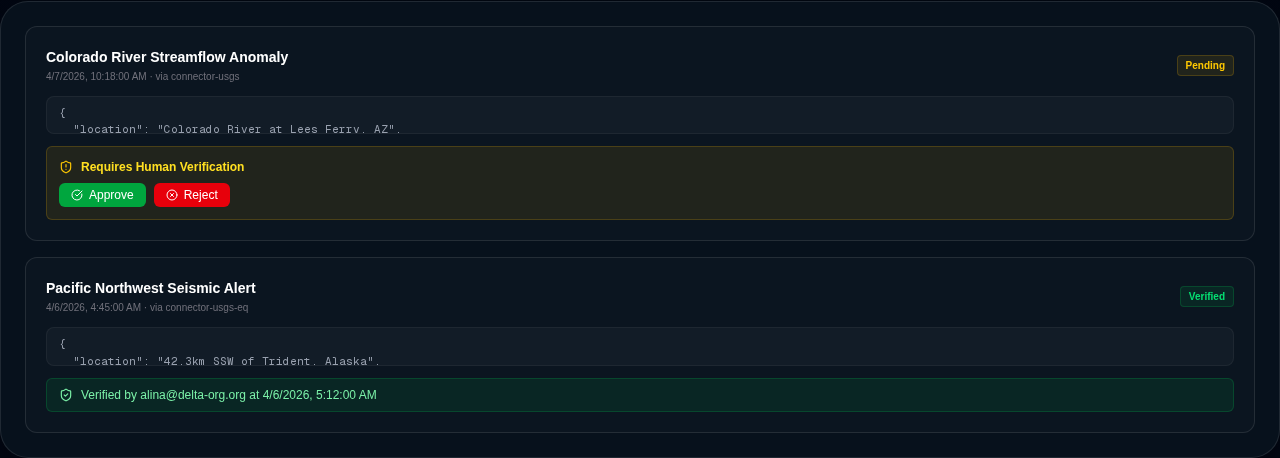
Alerts watch your streaming data; notifications are where those alerts land. Every time an alert fires, Delphi creates a notification on the dashboard’s notifications feed — a structured record of what matched, what it looked like, and what the reader is expected to do about it. This page is about that feed and what you can do from it.
The notifications feed
Notifications are stored on each command center and appear on the Alerts tab. Each entry carries:
- The name of the alert that produced it.
- The matched observation that tripped the alert, preserved verbatim so you can see exactly what the agent saw.
- A rendered view — a sparkline, map, value card, or markdown block — picked from how the alert was configured.
- A server-side timestamp. Client clocks are never trusted.
- A dismissed/active state, defaulting to active.
- A type tag (typically alarm for connector-alert-driven notifications).
- A verification state when the underlying recommendation is gated behind a human decision.
- A link back to the full recommendation record on the dashboard, when one exists.
A notification is not a state machine — each alert match creates a new entry, and the feed is the unfiltered list of everything that’s fired. Dismissal is per-notification; dismissing one doesn’t affect the underlying alert or future matches.
Dismissing and annotating
The Alerts tab shows undismissed notifications by default so the feed stays actionable. Dismiss a notification when you’ve read it, handled it, or decided it doesn’t need action — the entry drops out of the default view. Dismissed notifications aren’t deleted; they’re still queryable and auditable, and the audit log records who dismissed each one and when.
Annotations are supported for cases where you want to leave a note on a notification for your teammates — a quick “we’re tracking this separately in Jira” or “false alarm, the sensor was recalibrated.” Annotations don’t change the underlying data, just the human context next to it.
Verification gates for AI recommendations
Some notifications carry more than a matched observation — they carry a recommendation from an AI agent about what to do next. “The Colorado River streamflow dropped 22% below the seasonal baseline; recommend notifying the water management team and opening a conservation advisory.” When a recommendation requires human sign-off before anything acts on it, the notification renders an inline verification gate — a panel with the recommendation, the agent’s reasoning, a confidence score, and three buttons: approve, reject with a reason, or drop into chat to ask a follow-up question before deciding.
Verification status flows from pending to approved or rejected, and the decision is written to the ledger with the actor, the timestamp, and the reason for any rejection. A rejected recommendation does not propagate to an action proposal; an approved one can.
This is how Delphi bridges “the agent noticed something” and “we did something about it” without giving the agent free rein. Every meaningful AI-recommended action passes through this gate, and every decision leaves a trail.
Recommendations as a distinct concept
Notifications are the triggering surface; recommendations are the structured suggestion behind them. Each command center keeps its own list of recommendations, with the source data, the reasoning chain, the proposed action, linked visualizations, and the verification state on each one. A notification usually links back to its recommendation so you can drill from the feed into the full context.
Recommendations can also exist without notifications — a scenario run might generate a batch of recommendations that an analyst reviews on their own time rather than in a live feed. But when a recommendation needs immediate attention, it travels via a notification.
Upstream and downstream
- Upstream: Alerts produce notifications when their conditions match streaming data. Agentic alerts feed their
firedecisions into notifications along with the evaluator’s explanation and confidence. - Downstream: Approved recommendations with action intent become governed action proposals, which route through the execution policy and approval workflow before anything ships.
What gets logged
Every notification creation, dismissal, verification decision, and linked recommendation state change is written to the audit log with the actor, timestamp, and target. Between the audit trail and the ledger events on any approved actions, you have a complete, hash-chained record of what the agent noticed, what the humans decided, and what ultimately happened — readable end-to-end without digging through application logs.
Explainable agency on recommendations
Recommendations can carry an agent reasoning record that captures what data the agent used, what its objective is, and what alternatives it considered. When present, the notification renders a collapsible “Agent Reasoning” section so reviewers can understand the why before approving or rejecting.
Delphi can also auto-propose governed actions directly from analysis findings. For example, after running a Resource Sufficiency scenario that returns a “defer” decision, the agent proposes an escalation action; for a “conditional” decision, it proposes a notification. These proposals flow through the same policy checks and approval workflow as any other governed action, and the agent reasoning travels with the proposal end-to-end.