

Delphi is designed to play well with the rest of your AI ecosystem. Rather than locking you into a fixed toolset, you can bring your own tools from any Model Context Protocol server and Delphi will load them alongside its built-in capabilities. It is standards-based, vendor-neutral, and takes about a minute to wire up.
What MCP is
The Model Context Protocol is an open standard for connecting AI agents to tools, data, and services. An MCP server exposes a set of tools and resources over a well-defined interface, and any MCP-aware client — including Delphi — can discover and call them without bespoke integration code.
If you already run MCP servers for weather data, internal wikis, ticketing systems, vector stores, or custom internal APIs, you can point Delphi at them and those tools become available inside your chat experience immediately. If you want the inverse — letting external agents call into Delphi — see Expose Delphi as an MCP server.
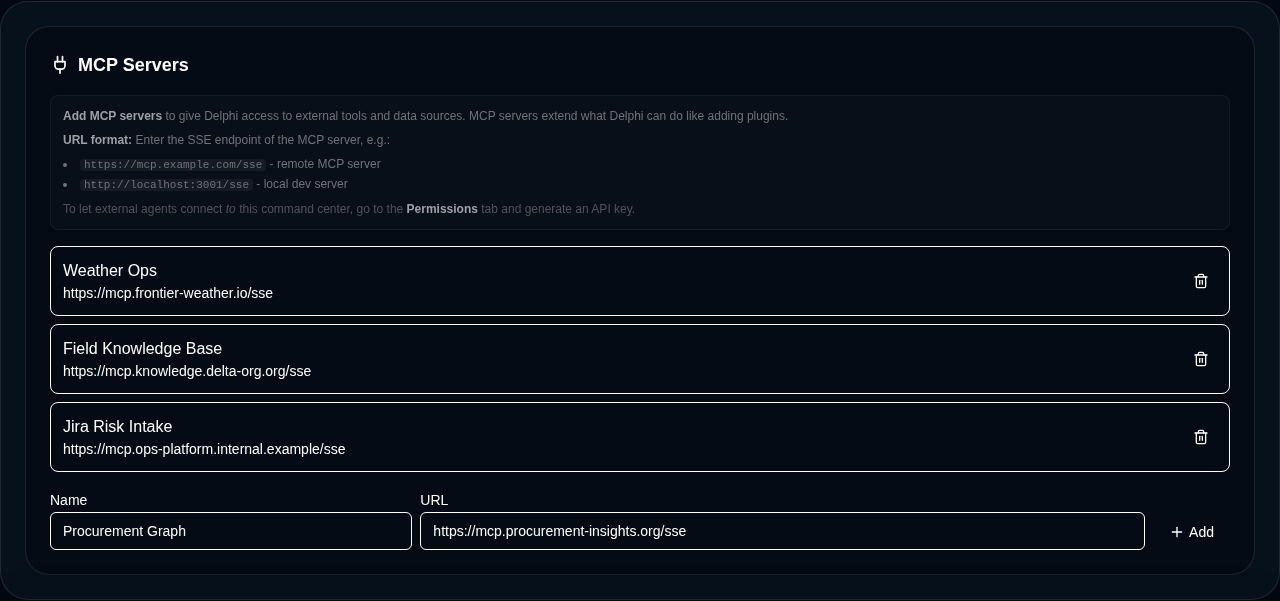
Add an external MCP server
MCP server connections are configured per-dashboard on the root Delphi agent. The flow is five steps:
- Open the command center.
- Go to Agents and select the main Delphi agent.
- Under MCP Servers, click Add Server.
- Paste in a short server name (for example,
weatherorwiki) and the server’s URL. - Save.
The URL is the endpoint the server’s operator publishes for MCP clients to connect to. The short name is how the external tools get namespaced inside Delphi — pick something your chat users will recognize.
Each dashboard maintains its own independent list, so a finance command center can connect to different tools than an operations command center on the same tenant. Add as many servers as you need — Delphi loads them all in parallel on each chat request.
Tenant-wide MCP servers
If you operate several command centers on the same tenant and want a shared toolset across all of them — an internal wiki, a shared ticketing API, a corporate knowledge base — you can configure tenant-wide MCP servers once and have every dashboard inherit them. Tenant-level MCP servers are admin-only to manage, and they merge with each dashboard’s own list at chat time so individual command centers never have to copy the configuration.
The merge is additive. A dashboard’s MCP server list is the union of its own entries and the tenant-wide entries; if a dashboard adds a server that uses the same short name as a tenant-wide one, the dashboard-level entry wins for that command center. This lets one team override a shared server with a custom variant without disturbing anyone else, while every other dashboard on the tenant keeps reading from the canonical source.
Tenant-wide servers are the right tool when the same handful of integrations should be everywhere by default. Use per-dashboard servers when a tool only makes sense in one workspace, or when you want a single command center to talk to a sandbox copy of a shared service.
Loading and using external tools
Once a server is saved and enabled, Delphi connects to it at the start of every chat turn, fetches its tool catalog, and merges those tools into the agent’s available toolset. Each tool is automatically namespaced under the server name you chose, so weather/get_forecast will never collide with a built-in tool or with a tool from another server named the same thing.
From the user’s perspective nothing changes — you just chat with Delphi normally and the agent picks the right tool for the job. Delphi gives each server a ten-second connection budget, and any server that is slow, unreachable, or misbehaving is quietly skipped for that turn rather than stalling the conversation. Your built-in tools always keep working, even if an external server is down.
Security: URL validation and request safety
Because Delphi is fetching URLs on behalf of users, every MCP server URL is validated before any connection is opened. Only HTTPS is permitted in production — plain HTTP is rejected except for local development against localhost. URLs with any other scheme are refused outright.
Delphi also blocks any URL that would route to an internal network, a loopback address, or a cloud-provider metadata endpoint — the standard set of targets a malicious server-side request would try to reach. The check runs on both literal IP addresses and the resolved hostname, so a public hostname that points at an internal address is caught before any socket is opened. If a URL fails validation, the server is skipped for that turn — Delphi never silently falls through to a risky connection.
When to use external MCP vs built-in tools
Reach for an external MCP server when you need capabilities Delphi doesn’t ship with, when you already maintain an MCP server for another agent stack and want to reuse it, or when the tool needs to run inside your own network or security boundary. MCP servers are also the cleanest way to expose proprietary or customer-specific data sources without asking your Delphi operator to build a new connector.
Stick with built-in tools for everything Delphi already covers — data connectors, visualizations, KPIs, reports, governed execution, and the rest of the platform. Built-in tools are tenant-aware, respect your RBAC scopes and data classifications automatically, and benefit from Delphi’s audit logging end-to-end. External MCP tools are a powerful extension point, but they live outside that guarantee surface, so treat them like any other third-party integration: trust the operator, pin the URL, and review what the tools do before you enable them in production.