

Chat is not a feature of Delphi. Chat is the platform. You describe what you want in plain language, and Delphi does the work — pulling data, building visualizations, running scenarios, drafting reports, and answering questions grounded in your command center.
Every other surface in Delphi (metrics, data, alerts, scenarios, reports) is something the chat can reach into and change on your behalf. If you can say it, Delphi can usually do it.
How to ask a good question
Be specific about the outcome you want, not the steps. Delphi decides which tools to call — your job is to describe the decision you’re trying to make. Name the entities, the time window, and the comparison you care about.
Vague prompts get vague answers. “Show me the numbers” forces Delphi to guess. “How has groundwater in the Rift Valley changed over the last 90 days compared to the previous quarter?” gives it everything it needs to pick the right data source, window, and visualization.
Build a KPI card for average response time on the support queue, compared to last month, down is good.
What’s driving the spike in alerts from the water quality connector this week?
If you don’t know what’s possible, just ask. “What can you tell me about this dashboard?” is a perfectly good opening — Delphi will inventory what’s connected and suggest next steps.
What Delphi can do
Delphi can create and update dashboards, add and remove visualizations, configure connectors, write alerts, run scenarios, generate reports, query your documents, and answer questions that cross multiple data sources. It can also reach out to public data — weather, economic indicators, geological surveys, census data, and more — and wire any of it into your command center as a live connector.
On the enterprise side, it can query Google Workspace, Slack, BambooHR, Workday, Salesforce, Asana, and Linear, subject to your role and the dashboard’s connected accounts. See the data connectors overview for the full list.
Add a map layer showing active FEMA disaster declarations in Texas over the last 12 months.
Create an alert that fires when the reservoir level drops more than 5% in a single day.
What Delphi will do depends on your role. Viewers get read-only access to public data. Analysts can query, explore, draft scenarios, and export reports against public and internal data. Auditors can read across public, internal, and confidential data to verify controls without making changes. Editors, admins, and owners can mutate the dashboard — creating datasets, visualizations, KPIs, and alerts. See Roles and permissions for the full breakdown.
How chat picks a specialist
Behind the scenes, every chat turn goes through a small router before it reaches a specialist. The router reads short pitches from every chat agent available on the dashboard and hands your turn to the one best suited to answer.
The two defaults are Delphi (the heavy generalist — multi-step reasoning across data, documents, and tools) and Layout (a visualization specialist — read-only, emits inline charts and KPI cards). You don’t address them by name; ask in plain language and the router picks. “Build me a KPI card for response time” goes to Layout; “what’s driving the spike in alerts this week?” goes to Delphi.
You can add your own chat agents — finance specialists, compliance reviewers, support deflection agents — from the Agents tab. Each new agent carries its own role gate, skill set, knowledge sources, and pitch, and the router learns about it automatically.
Citations and grounding
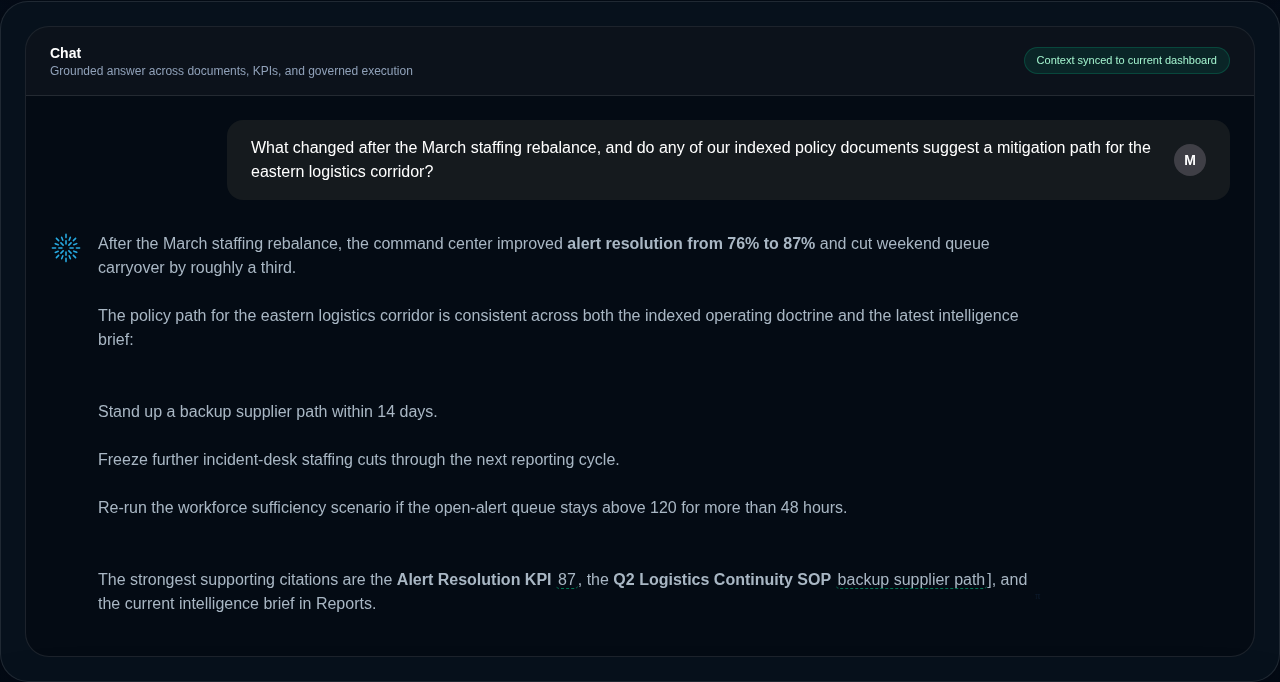
Delphi answers from your data, not from memory. When it pulls numbers, it tells you which dataset, connector, or document they came from, and when they were last updated. KPI cards carry provenance badges you can click to see the full lineage.
If Delphi can’t find grounding for a claim, it will say so rather than guess. You can always ask “where did that number come from?” and it will walk you through the source chain. For documents you’ve uploaded, Delphi cites the specific file and flags its authority level — canonical sources carry the most weight, while reference, field report, and unverified sources are labeled accordingly so you can judge how much to trust each citation.
Citations are part of the conversation record, not a stream-time flourish. Reopen a chat from last week and every citation is still there and still checkable — Delphi re-verifies each one against the data it was grounded in as the message scrolls into view, rather than taking the earlier session’s word for it. A long history verifies as you read it, not all at once when you open it.
Observed, or projected
Every data source Delphi can reach declares what kind of thing it returns: a direct observation, or a model output — a forecast, an estimate, a projection. That declaration belongs to the platform rather than to the tool fetching the data, which is what keeps it honest: a source can’t describe itself as measured when it isn’t.
It matters because the two read identically on a chart. Rainfall recorded last month and rainfall forecast for next month are both a number with a date, and only one of them happened. Delphi carries the distinction into its answers, so a projection is described as a projection even when you didn’t ask.
Sources your own organization connects are the one place that call is yours to make. Nobody but you knows whether the endpoint you wired up returns sensor readings or a model’s estimates, so until someone says, Delphi assumes the weaker claim and treats the feed as model output. An editor can declare what a feed actually returns, and from then on answers built on it carry that origin — marked as declared by your organization rather than assessed by Outcome, so a reader always knows whose word they’re taking. Every declaration is recorded in the audit trail.
Evidence coverage (preview)
Delphi can also check its own answers, summarising underneath each response how much of what it told you traces back to the data it retrieved, and pointing out the claims that don’t.
It’s a measure of traceability rather than correctness — it tells you which parts of an answer you can follow back to a source, not whether the answer is right. It isn’t the model rating its own confidence either; that number sounds meaningful and isn’t.
This one is in preview and enabled per command center, so a team can try it without switching it on for the whole organization. Talk to us if you’d like to.
When to ask for a report instead
Chat is for questions, exploration, and quick changes. Reports are for anything you want to save, share, or come back to — intelligence briefs, trend analyses, risk assessments, and status updates. They’re stored in the Reports tab and can be exported to PDF.
Ask for a report when the output matters as a durable artifact. Ask in chat when you just want the answer.
Write an intelligence brief on our Q1 performance across all operational functions, with recommendations.
For “what if” questions — staffing changes, budget reallocations, policy shifts — use scenarios instead. Scenarios are reproducible, comparable, and versioned; chat-only analysis is not.
Tips for power users
Stack context. If you’ve just asked about one metric, follow-up questions inherit the frame — you don’t need to repeat the time window or the entities. “And how does that compare to the north region?” works.
Use the active time window and filters on the dashboard. Whatever you set in the context bar flows into chat automatically, so “what changed?” is interpreted against the window you’re actually looking at.
Ask it to explain its reasoning. “Why did you pick that dataset?” or “walk me through how you got that number” surfaces the tool calls and source data behind any answer.
Summarize my uploaded documents on the new compliance policy and flag anything that contradicts our current SOPs.
Finally, don’t pre-optimize. Delphi is designed to handle messy, half-formed questions and refine them through conversation. Start somewhere, and iterate.