

Your institutional knowledge doesn’t live in a database. It lives in PDFs, Word docs, policy binders, field reports, and shared drives. Delphi treats documents as first-class data sources alongside your connectors and KPIs, so every answer can be grounded in your own material. Retrieval is semantic, not keyword-based — you can ask questions in the language your team actually uses and Delphi will find the passages that matter.
Add a document
Open the Data tab on any command center and upload a file, or promote a Google Drive file directly from chat by asking Delphi something like “add this doc as a data source.” PDFs, Word documents, spreadsheets, plain text, and Google Docs are all supported, up to 30MB per file.
Storage uploads start indexing automatically the moment they land. Drive files are promoted through chat because Delphi needs your own Google OAuth to fetch them the first time — once a Drive file is indexed, any teammate with access to the command center can ask questions about it without needing their own Drive connection.
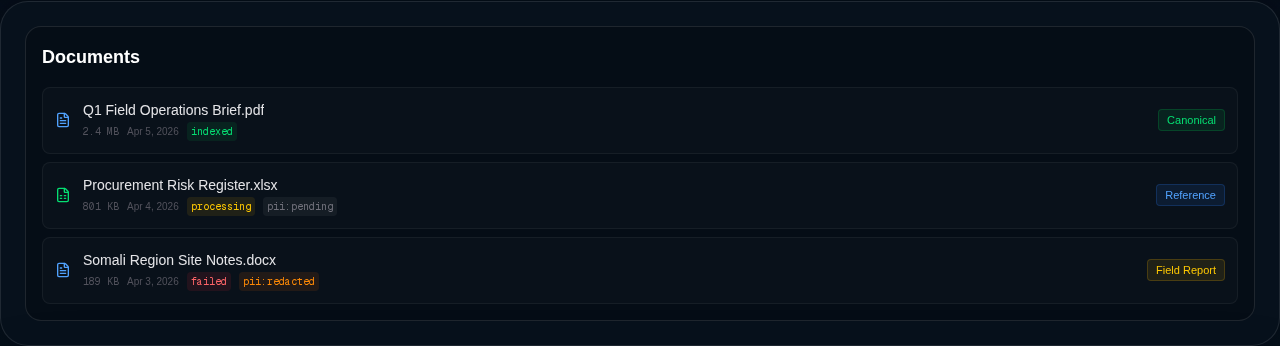
Editors can rescan any document from the Documents list — the rescan button re-runs the whole pipeline (PII scan, redaction, chunking, re-embedding) on demand. It’s the same action that fires automatically whenever you change a document’s classification. You’ll see a live status pill next to each file: pending, processing, indexed, or failed, plus a pii:redacted or pii:blocked pill if the scan found anything worth flagging.
How indexing works
When a document is added, Delphi extracts its text, breaks it into overlapping passages, and builds a semantic index so the meaning of each passage can be searched — not just the exact words. This is the RAG (retrieval-augmented generation) pattern: when you ask a question, Delphi finds the most relevant passages first, then uses them as grounded context for the answer.
Because the index is semantic, a question about “staff turnover” will surface a passage that talks about “attrition” or “people leaving the program.” You don’t need to match the document’s exact phrasing.
Every dashboard has its own private index. Document content never leaks across command centers or tenants.
Grouping documents with vector stores
Once you have more than a handful of documents, you can curate them into named vector stores — knowledge collections that scope a chat agent’s reach to a specific slice of your content. The platform-managed All Documents store covers everything; you build additional stores when different agents or different audiences should be looking at different sets.
A store doesn’t copy data; it’s a membership policy that Delphi uses to constrain its search. The store’s classification is inherited as the maximum of its members, so role-based access applies at the store level too.
See Vector stores for how to create them, when they’re worth the trouble, and how chat agents are scoped to one.
Ask Delphi about your documents
Open the chat panel on any command center and ask in plain language. Two patterns work well:
- Summarize a specific document. Ask “summarize the Q3 safeguarding report” and Delphi will read the full document and give you a structured summary.
- Search across everything. Ask “what do our policies say about conflict-of-interest disclosures?” and Delphi will retrieve the most relevant passages from every indexed document and answer with citations.
See Chatting with Delphi for more on how the agent picks tools and cites sources. If you want a formal written deliverable rather than a quick answer, ask for a “report” or “brief” explicitly — otherwise Delphi will answer conversationally and keep the chat fast.
Authority levels
Not every document deserves the same weight. Delphi lets you tag each one with an authority level so the agent knows how much to trust it:
- Canonical — the official source of truth. Signed policies, board-approved strategies, published financial statements. Delphi will prefer these over anything else when they conflict.
- Reference — a credible secondary source. Vendor reports, partner briefings, peer-reviewed research.
- Field report — first-hand observations from the ground. Useful and often urgent, but unverified.
- Unverified — unknown provenance. The default for anything uploaded without context.
Owners, admins, and editors can change a document’s authority from the Documents list. The agent reflects these labels in its answers — if a field report contradicts a canonical policy, it will say so explicitly rather than picking a side.
Authority is about trust (“how much weight should the answer give this source?”) and is separate from classification, which is about sensitivity (“who’s allowed to see it?”). A canonical-authority HR policy can still be confidential-classification; a field-report from a community partner can still be public.
Classifications
Every document carries a sensitivity classification. It does two jobs at once: it gates who can read the content back via chat, and it tells the PII scanner how strict to be about blocking.
- Public — fit to share with anyone, inside or outside the org. Marketing material, annual reports, published policies.
- Internal — for org members only. Default for most operational content.
- Confidential — restricted to admins, owners, auditors, and editors. HR-adjacent material, sensitive contracts, finance.
- Restricted — admins and owners only. The most sensitive material in the system.
Editors and above can change a document’s classification from the Documents list. Changing it triggers an automatic rescan — see the next section for why that matters.
Read-side access follows your role: viewers see public only; analysts add internal; auditors add confidential; editors add everything except restricted; admins and owners see all four tiers. See Roles and access for the full matrix.
Privacy and PII scanning
Every document is scanned for sensitive information before it’s indexed. Delphi looks for names, emails, phone numbers, addresses, government IDs, medical record numbers, and payment card data. What happens when it finds something depends on the classification you gave the document.
There are two ways the scanner can flag a doc:
- Categorical — the scanner found something high-sensitivity by type: a social security number or a medical record number.
- Density — the scanner found more than ten PII items in total, regardless of type. This is the signal that triggers on a structured personnel file or a customer export.
Public classification overrides both — public docs are an explicit user declaration that the content is fit to share, so findings are still redacted and recorded but never block indexing. Internal classification overrides density only — categorical findings still block, because an internal doc full of SSNs is almost certainly mis-labelled and worth a human looking at. Confidential, restricted, and unlabelled docs follow the strict default: any block fires.
| Block reason | Public | Internal | Confidential | Restricted | Unlabelled |
|---|---|---|---|---|---|
| Categorical (SSN, medical) | redact and index | block | block | block | block |
| Density (>10 findings, no categorical) | redact and index | redact and index | block | block | block |
Findings are recorded on the doc either way, so an admin can see exactly what tripped a bypass.
When you change a document’s classification, Delphi automatically reruns the scan with the new policy applied. If a public report was incorrectly blocked under a stricter label, simply reclassifying it as public will rescan and (usually) reindex it without any further action.
PII scanning is fail-closed: if the scanner can’t run for any reason, the document won’t be indexed. No unscanned content ever makes it into the searchable index.