

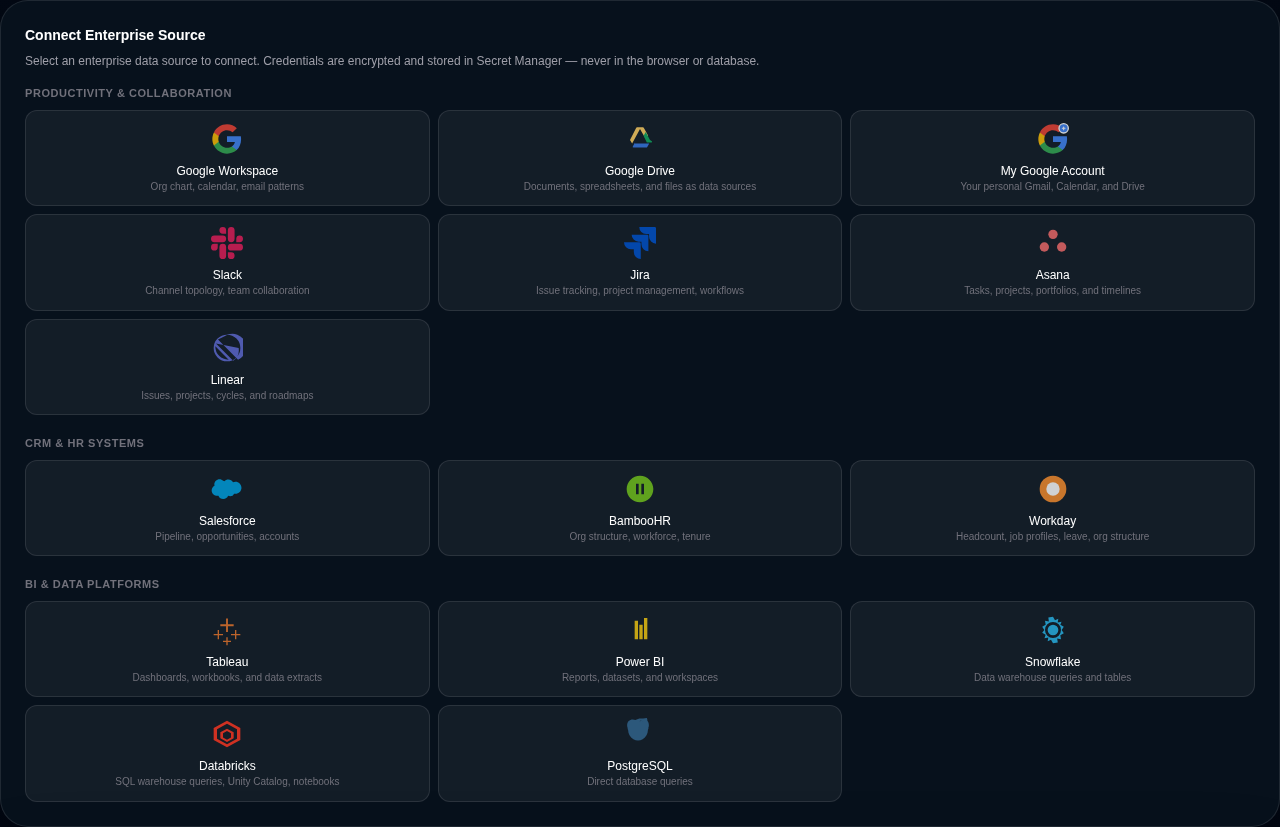
Chat is Delphi’s primary way to add data sources — tell the agent what you want and it wires up the connector for you. But some situations call for explicit, form-based setup: complex OAuth flows, multi-step credential exchanges, classifications that need to be set at creation time, or teams whose credential management lives in a separate security process. The Data tab’s connector setup UI is the path for those cases.
When to reach for the setup UI
Use the setup UI when:
- You’re wiring up an OAuth2 enterprise integration and want the consent flow to happen visually, not from chat.
- You need to set classification and scope at creation time rather than after the fact.
- Your security posture requires a human eye on the credential being pasted.
- You’re configuring a provider with multi-field authentication (host + token + region, service account key + project ID, client ID + client secret + redirect URL).
Stick with chat when you’re exploring, when the connector is a public data source that doesn’t need credentials, or when you want Delphi to decide which connector fits the question you’re asking.
The two paths are peers, not alternatives. A connector created through the setup UI is indistinguishable from one created through chat — same schema, same lifecycle, same downstream wiring to datasets and visualizations.
The setup flow
Open the Data tab on any command center and look for the Add connector button. You’ll see the full list of supported providers grouped into three categories:
- Productivity — Google Workspace, Google Drive, Google Personal, Slack.
- CRM and HR — Salesforce, BambooHR, Workday, Jira, Asana, Linear.
- BI and data — Tableau, Power BI, Snowflake, Databricks, PostgreSQL.
Each provider has its own form tuned to its authentication model. The Google Workspace form walks you through an OAuth2 consent flow with domain-wide delegation. The Snowflake form asks for account, username, and an authenticator choice (password, key pair, or SSO). The Salesforce form handles its Connected App setup. Fields are validated client-side before the credential hits the wire so you can’t save a partial configuration.
How credentials are protected
Raw credentials never land in dashboard data. Every secret you submit — OAuth refresh tokens, API keys, service account JSON, database passwords — is handed straight to a managed secret store with its own IAM, audit trail, and rotation primitives. What ends up on the connector is a pointer; the actual secret material lives elsewhere, gated by separate access controls.
At runtime, Delphi resolves the pointer just in time for the outbound call and drops the plaintext credential as soon as the request finishes. A dashboard export, a database dump, or a shoulder-surf of the admin UI never reveals the credential because it never exists there to begin with.
Rotation happens in the secret store without touching dashboard configuration. Publish a new secret version and the next pipeline run picks it up automatically. No connector reconfiguration, no downtime, no forgotten places the old credential might still be cached.
Classification and scope at setup time
The setup UI lets you pick a classification (public, internal, confidential, restricted) before the connector ships its first row. That tag propagates to every dataset the connector produces, so read-side enforcement is in place from the moment data starts flowing. You can change the classification later — ownership and admin scope required — but setting it correctly up front is the cheap path.
See roles and permissions for how the classification combines with role scope to gate access.
Per-provider forms
Every shipped enterprise connector has its own setup form with provider-specific wiring:
- Google Workspace, Drive, Personal — OAuth2 consent, optional domain-wide delegation for workspace-level reads. Personal Google accounts are connected from your own account settings (Connected Accounts), not per dashboard — they follow you across every command center you have access to, and you can connect more than one personal Google account if you work across multiple identities.
- Slack — bot token or OAuth2, workspace selection.
- Salesforce — Connected App with OAuth2 refresh token or JWT bearer flow.
- BambooHR — subdomain + API key.
- Workday — tenant URL + service account credentials. On connector creation, Delphi auto-creates dataset docs for six resource types: workers, organizations, job profiles, time-off balances, positions, and compensation. When worker data first arrives, the org graph is automatically bootstrapped — formal hierarchy edges are built from manager-report relationships, the graph analyzer runs, and resource allocations are derived from meeting-load estimates. This powers the Workforce tab’s Sankey diagram and org graph from day one, without waiting for communication data.
- Jira, Asana, Linear — OAuth2 or API token depending on the workspace tier.
- Tableau, Power BI — personal access token or service principal.
- Snowflake, Databricks, PostgreSQL — connection strings with multiple authentication options including key-pair and SSO where supported.
If a provider you need isn’t on this list, talk to us — the underlying connector framework is designed to accommodate new providers without a schema change, and the roadmap depends on what customers actually ask for.
What happens after setup
A saved connector starts classifying its source automatically. Delphi looks at which integration it is and tags it as government, commercial, non-profit, academic, or personal — bls, noaa, census, and epa resolve as government; alphavantage, database, and most enterprise integrations as commercial; gbif, socrata, and open-data portals as non-profit. That tag feeds the credibility score on every dataset the connector produces, so a number coming off a .gov source ends up looking different from one coming off a private API even before anyone touches it. The connector card carries the same inherited classification badge you see on KPIs and visualizations — sensitivity tier pill plus credibility meter — so the trust posture of every source on the Data tab is visible at a glance.
From there, ask Delphi in chat to “show me what’s on the new connector” or “build a dashboard from the Workday headcount feed” and the agent will pull sample data, propose visualizations, and wire up the rest. The setup form is the first step; chat is still the editing surface for everything that comes after.